Piano Star: Rhythm Music Game
- 3.6
- Rating
- 5.00M
- Installs
- Free
- Price
 Analysis by App-foxy
I usually approach mobile rhythm games with one question: do they make me want to play one more song, or do they become disposable after a few minutes? Piano Star: Rhythm Music Game lands somewhere in the middle, but it has enough immediate appeal to earn a place on the phone of anyone who enjoys tapping along to music. It is a free music game from XGAME STUDIO, aimed at Everyone, and its central idea is easy to understand: follow the notes, keep your timing under control, and use successful play to build a collection of visual skins.
That simplicity is both its strength and its limitation. You do not need a tutorial-heavy introduction or previous rhythm-game experience to understand what to do. At the same time, players looking for deep composition tools, a serious practice mode, or the precision of a dedicated rhythm-game platform may eventually want something more specialized. My experience is that this works best as a quick, accessible music game rather than as a complete replacement for every other rhythm app.
How the game feels in everyday play
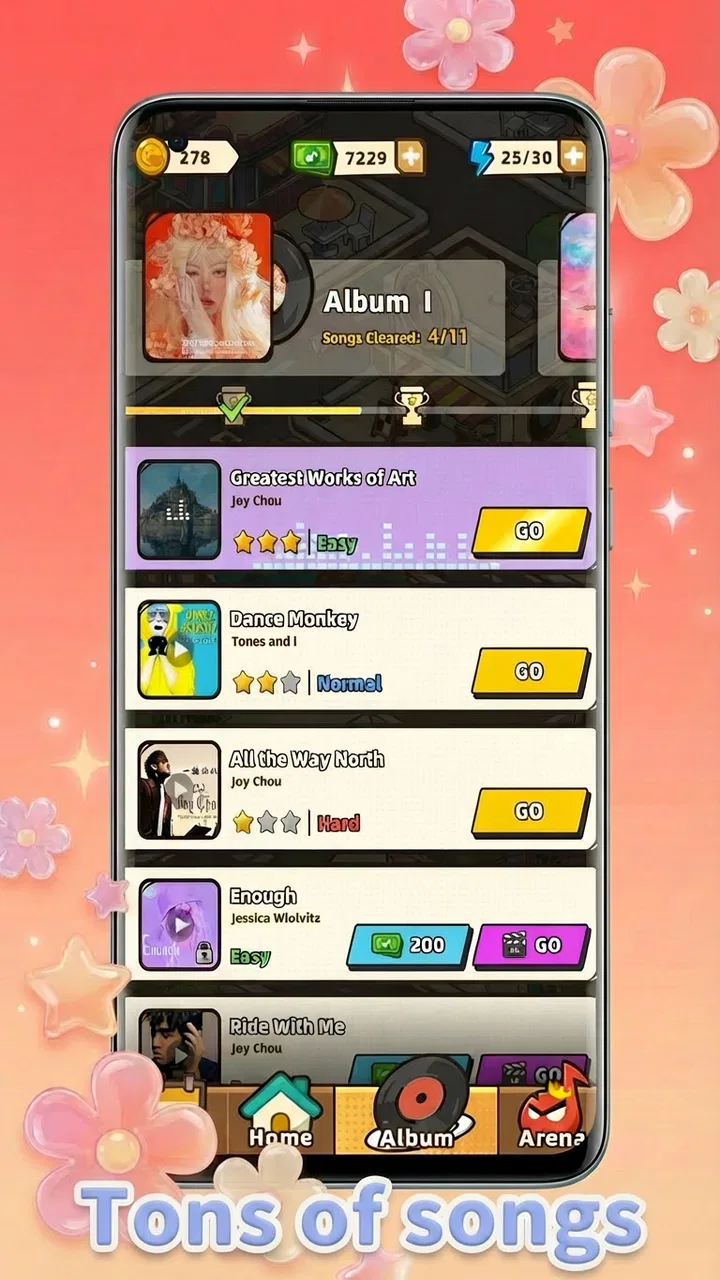
The first few sessions are built around familiar mobile-game comfort. Songs provide the structure, notes give you an immediate task, and the appeal comes from trying to stay in time while the screen fills with movement. The store summary points toward hit songs, speed tests, and collectible skins, and that combination gives the game a clear loop: play, improve your reactions, and keep returning for another attempt.
You May Also Like

 Blood Strike: 2.5 Anniversary
Blood Strike’s Loadouts Turn Every Drop Into a Tactical Gamble
A close look at Blood Strike’s custom loadouts: how fast access to signature weapons reshapes its battle royale rhythm, rewards preparation, and narrows the gap between fights.

 Pandora - Music & Podcasts
Pandora’s Music Is Easy to Start, but Harder to Recover
Pandora’s strength is its low-effort path from a seed to a station. Its weak spot is how much confidence it asks you to place in connection, setup, and quiet recovery.

 8 Ball Pool
 Is Built on Rivalries, Rematches, and Routine
A close look at the rivalries, rematches, shared routines, and unanswered safety questions that turn a quick pool match into a persistent mobile community.

 Samsung Music
’s Quiet Strength Is Playing What You Already Own
Its reach comes less from spectacle than from dependable access to a personal library. That simplicity is both the app’s strongest retention engine and its ceiling.

 AccuWeather: Weather Radar
AccuWeather Review: A Quick, Clear Forecast for Everyday Decisions
For everyday plans, the best forecast is the one you can understand quickly. AccuWeather makes rain timing, radar, and local conditions easy to act on, with a few trade-offs.

 Hill Climb Racing
Why Hill Climb Racing Still Turns Crashes Into One More Run
A tiny car, a bumpy hill and one more upgrade: Hill Climb Racing keeps resurfacing because its simple chaos makes every near-miss feel personal.
More From Our News Desk



I found the format especially suitable for short breaks. If I had only a few minutes while waiting for an appointment or taking a quick pause from work, I could start a song without needing to prepare a long session. That matters because rhythm games can lose their charm when every attempt demands a large time commitment. Here, the basic attraction is available quickly, which makes the game easy to revisit.
The piano presentation also gives the experience a recognizable identity. It is not trying to be a full music-production tool, and I would not approach it expecting to compose, record, or learn piano technique. Instead, it turns popular-song energy into a reflex challenge. That distinction is important: success depends on following the game’s visual cues, not on knowing how to play an actual keyboard.
Learning the timing without getting overwhelmed
For a newcomer, the early learning curve is approachable because the goal is visible at all times. You can concentrate on the next note rather than study a complicated control scheme. My advice is to begin with a relaxed grip and avoid tapping harder than necessary. Excess pressure makes quick sequences feel more tiring and can distract from the timing itself.
Another useful habit is to watch the path of upcoming notes instead of staring only at the point where you need to tap. This gives your eyes a little more time to prepare for changes in speed or density. It is a small adjustment, but it makes a difference when a song becomes busier. Players who repeatedly miss notes may not have a reaction-speed problem; they may simply be looking too late.
The game is also a reasonable introduction to rhythm-game vocabulary. You start noticing the difference between reacting to individual notes and maintaining a steady visual rhythm. That makes it suitable for younger players and casual users who want something more active than a passive music player. The Everyone age rating reinforces that broad accessibility, although parents should still remember that the game includes optional in-app purchases.
What the skins add to the loop
Collectible skins are not just a decorative extra in a game like this. They give repeated sessions a small sense of direction after the novelty of the songs begins to settle. I like that this kind of reward can make improvement feel visible: even when a difficult track remains difficult, a successful attempt may still contribute to a longer-term collection goal.
The trade-off is that cosmetic rewards do not improve your timing. A new skin can make the game feel fresher, but it will not solve a song that you cannot read or perform consistently. I would treat the collection as a bonus rather than the main reason to play. If you enjoy customizing the look of a game, it can extend the appeal. If you only care about score and musical challenge, the skins may feel secondary.
A practical approach is to avoid chasing every cosmetic item immediately. First decide whether the songs and note patterns are enjoyable on their own. If they are, the skins become pleasant progress markers. If they are not, collecting more of them will probably not fix the underlying problem.
Free access and where spending fits
The game is free to install, so the initial decision is straightforward: you can try the core experience without paying an entry fee. That is useful for a rhythm game because personal taste matters so much. Some players enjoy tapping along to mobile arrangements, while others quickly notice that the interaction feels less precise than they want. Free access lets you make that judgment through play rather than guesswork.
Optional purchases range from $0.99 to $99.99 per item. I would read that range as a reason to set a personal spending limit before browsing any purchase screen, especially if younger family members use the device. The free starting point is real value for curious players, but the presence of optional spending means the overall cost depends on how much of the collection or progression you choose to pursue.
In my view, the best value comes from treating the free portion as a complete trial and paying only if the game has already become a regular habit. Buying simply because a cosmetic item is available is harder to justify than spending after you know you enjoy the songs and return voluntarily. Since the game is not sold as a one-time paid product, there is no need to rush into a purchase to unlock the basic idea.
This also answers an everyday question many people have: is it suitable for a child? The Everyone rating makes the content broadly accessible, but the purchase range still deserves adult supervision. I would use device-level purchase controls and explain that “free” refers to getting started, not necessarily to every optional item inside the game.
Performance habits that make sessions better
Rhythm games are unusually sensitive to distractions. Notifications, a slippery grip, and playing in a noisy place can make a simple sequence feel unfair. I had better sessions when I turned down interruptions, held the phone steadily, and played with enough room to look ahead. These are not hidden settings or magic improvements; they are small environmental choices that help the game’s timing challenge feel more consistent.
Screen size also changes the experience. On a compact phone, the play area can feel crowded when several notes arrive close together. A larger display may make visual reading easier, while a smaller device can be more convenient for quick sessions. I would not choose a new phone for this game alone, but people who already own both a small handset and a tablet may find the larger screen more comfortable for longer attempts.
When a song goes badly, replaying it immediately is not always the best response. I found it more useful to identify whether I was missing because I was early, late, or simply losing track of the next pattern. Taking a short pause can reset attention. This is one of the less obvious strengths of the format: it rewards concentration management as much as raw finger speed.
How it compares with other music games
Compared with a traditional piano-learning app, this is much more about quick reactions and entertainment than musical education. It will not replace guided lessons, sheet-music practice, or a real keyboard. Someone who wants to understand chords, fingering, or rhythm theory should choose an educational alternative.
Compared with a deeper rhythm-game platform, Piano Star is easier to approach but may feel less demanding for expert players. Dedicated rhythm games often build their identity around dense charts, advanced difficulty systems, competitive scoring, or highly specialized controls. This game’s appeal is more immediate: open it, follow the notes, and enjoy a short challenge. That makes it friendlier for casual players, though not necessarily the best destination for people who want a long-term technical discipline.
It also differs from a normal music-streaming service because listening is not the point. You are actively responding to the track. That makes it a better choice when you want something to do with music, not merely something to play in the background. On the other hand, if you are commuting and want uninterrupted listening, a streaming app is obviously more convenient.
Who will get the most from it
I would recommend this game to someone who likes recognizable music, short mobile challenges, and collectible presentation. It is particularly suitable for a casual player who wants a low-commitment activity that can be understood in seconds. The broad age rating also makes it an approachable family-device option, provided adults manage optional purchases responsibly.
It can also work for players who enjoy practicing visual attention. A useful routine is to play one easier song as a warm-up, then try a faster track while focusing on looking ahead rather than reacting at the last instant. That turns a few spare minutes into a small concentration exercise without pretending that the game is formal training.
I would be more cautious about recommending it to competitive rhythm-game enthusiasts. If your enjoyment depends on extremely demanding charts, precise calibration, extensive score analysis, or a large technical progression system, you may outgrow the experience. Likewise, people who dislike in-app purchase prompts or cosmetic collecting should decide whether the free play remains satisfying before investing time in the longer loop.
What the current release tells me
The game was released on June 2, 2024, and the current version is 1.4.1. It runs on Android 7.0 or later, which gives it a fairly broad compatibility window for Android users who are not carrying the newest device. That is helpful for a casual title: you do not necessarily need recent hardware to see whether its basic gameplay suits you.
Its reach is also substantial, with over five million installs and an average rating of 3.6 from around two thousand ratings. I would interpret that as evidence of real interest, not as a guarantee that every player will be satisfied. A mid-range average usually suggests a mixed experience: plenty of people enjoy the accessible rhythm loop, while others may be bothered by difficulty, repetition, presentation, or the way optional spending fits into the game.
There are six reviews shown alongside those ratings, so I would place more weight on trying the game personally than on drawing a strong conclusion from a small written-review sample. The rating is useful context, but rhythm games are highly dependent on your preferred pace, screen, music taste, and tolerance for retries.
My practical recommendation before spending
My suggested workflow is simple. Install it, play several different songs, and notice whether you are enjoying the act of keeping time or merely chasing the next reward. Then try a faster session and see whether the challenge feels motivating or frustrating. Only after that should you consider optional items.
If you do spend, keep the purchase tied to a clear reason: a cosmetic collection you genuinely like or a feature that improves your personal enjoyment. Do not assume that a more expensive item will make you better at the game. Skill comes from reading the notes and controlling your timing, while purchases mainly affect what you can access or collect within the game’s free-to-play structure.
For a shared family phone, I would also create a rule that purchases require permission. The low end of the purchase range may look harmless, but repeated small decisions can change the total. The game’s free entry makes it easy to test, so there is no practical reason to use spending as a substitute for deciding whether the core play is enjoyable.
My verdict on the value
Piano Star: Rhythm Music Game is a likable, accessible music game with a clear reason to return: tap through songs, challenge your reactions, and build a visual collection. I appreciate that the free starting point lowers the risk for curious players, while the piano-themed presentation gives the experience more character than a completely bare rhythm test.
Its weaknesses are just as important. The game is not a piano lesson, not a music player, and not automatically the right choice for advanced rhythm specialists. The optional purchase range means careful users should separate free enjoyment from paid collecting, and the average rating suggests that the uncomplicated format will not satisfy everyone equally.
My final recommendation is to try it if you want quick, approachable rhythm play and can treat the skins as optional extras. I would skip it in favor of a dedicated learning app if your goal is to develop real keyboard skills, or a more specialized rhythm game if you need deep competitive systems. For casual sessions, family-friendly accessibility, and a low-pressure first look at music games, it delivers enough value to be worth trying before deciding whether any purchase belongs in your experience.
FAQs for Piano Star: Rhythm Music Game
01What is Piano Star: Rhythm Music Game?
Piano Star: Rhythm Music Game is a mobile app designed for music enthusiasts who enjoy interactive and rhythmic gameplay. Players tap on tiles in time with the music to earn points and unlock new songs. It offers a wide range of songs across various genres, providing an engaging experience for users of all ages.
02Is Piano Star: Rhythm Music Game free to play?
Yes, Piano Star: Rhythm Music Game is free to download and play. However, it does offer in-app purchases that allow users to access premium features, remove ads, or unlock additional songs and game modes. The game is designed to be enjoyable without spending money, but these purchases can enhance the experience.
03What are the system requirements for Piano Star: Rhythm Music Game?
Piano Star: Rhythm Music Game is compatible with both Android and iOS devices. It requires Android 4.4 or later and iOS 9.0 or later. The app is optimized to run smoothly on most smartphones and tablets, ensuring a seamless gaming experience with minimal lag or crashes.
04Does Piano Star: Rhythm Music Game require an internet connection?
Piano Star: Rhythm Music Game does not require a constant internet connection to play. However, some features, such as downloading new songs or accessing certain game modes, may require internet access. Players can enjoy the majority of the game offline, making it a great option for on-the-go entertainment.
05Can I play Piano Star: Rhythm Music Game with friends?
Currently, Piano Star: Rhythm Music Game is primarily a single-player experience. However, it features leaderboards where players can compare their scores with friends and other users globally. While direct multiplayer modes are not available, competing for high scores adds a social element to the game.
Pros
- Engaging gameplay with intuitive controls.
- Wide variety of popular song choices.
- Regular updates with new tracks.
- Visually appealing with smooth animations.
- Offline mode available for on-the-go play.
Cons
- Ads can be intrusive during gameplay.
- Some songs require in-app purchases.
- Limited customization for avatars.
- Occasional lag on older devices.
- No multiplayer or social features.

Piano Star: Rhythm Music Game
Gallery